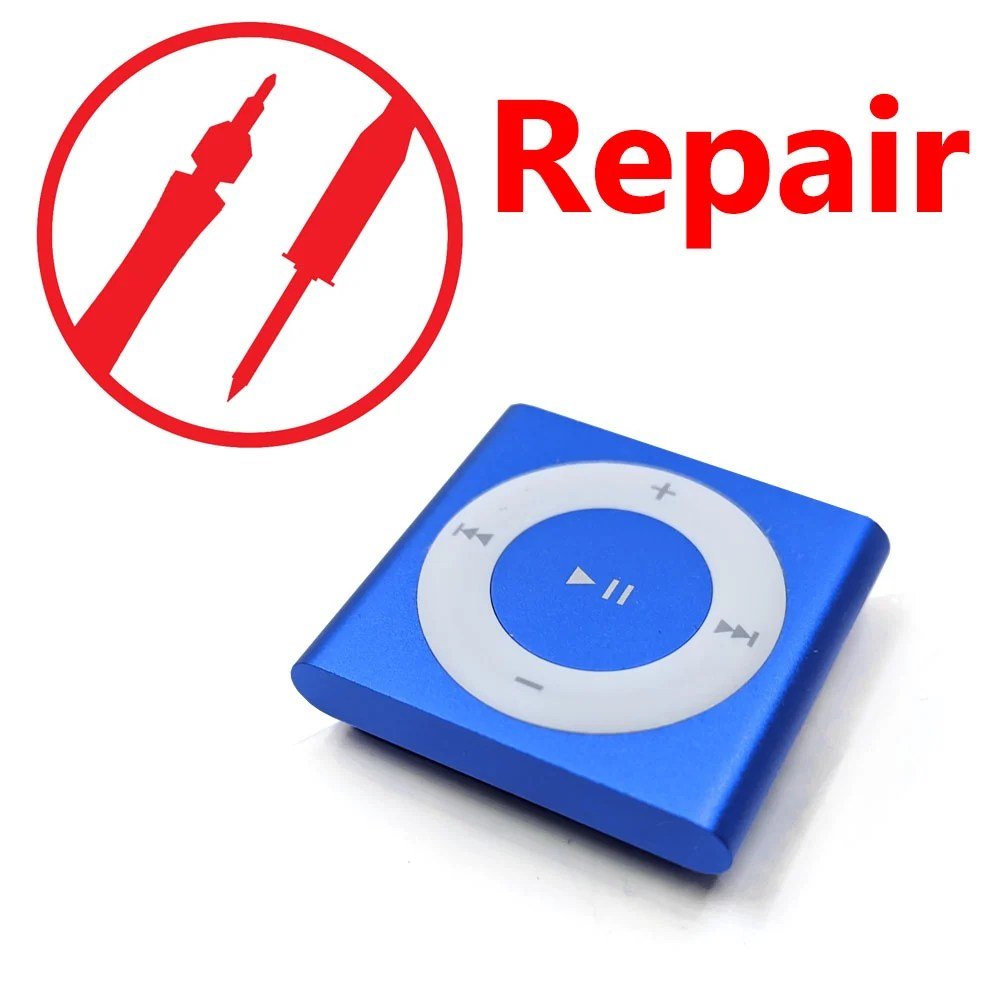
For many, the mention of an iPod instantly conjures images of tiny screens and clickable scroll wheels. But for a dedicated few, the true essence of portable music distilled down to its purest form lies in the often-overlooked iPod Shuffle. Specifically, the 4th Generation model, released in late 2010, carved out a unique niche, proving that less could indeed be more. This comprehensive exploration dives deep into the iPod Shuffle 4th Gen Overview & Features, revealing why this diminutive device, despite its lack of a screen, became a beloved companion for workouts, commutes, and anywhere simplicity reigned supreme.
It wasn't about navigating vast libraries; it was about the joy of listening, amplified by clever design and an innovative auditory guide.
At a Glance: iPod Shuffle 4th Gen Essentials
Before we dive into the granular details, here’s a quick rundown of what made the 4th Gen Shuffle tick:
- Design: A compact, clip-on device reminiscent of the 2nd Gen, featuring tactile, clickable control ring buttons.
- VoiceOver: An indispensable feature that audibly announces song titles, artists, playlists, and Genius Mixes.
- Storage: 2 GB of internal flash storage, enough for approximately 500 songs (based on 4-minute, 128-Kbps AAC files).
- Battery Life: Up to 15 hours of continuous music playback on a single charge.
- Colors: Available in Silver (with a black ring) and vibrant Blue, Green, Orange (gold-ish), and Pink (all with white rings).
- No Screen: Lacks a display, meaning no photo or video support; purely an audio player.
- Connectivity: Charges and syncs via USB 2.0 using the 3.5-mm headphone jack.
- Lightweight: Weighing just 12.5 grams, it was designed for ultimate portability.
The Rebirth of Simplicity: What Defined the 4th Gen Shuffle?
When Apple unveiled the 4th Generation iPod Shuffle in late 2010, it felt like a purposeful step back in time, yet with crucial modern enhancements. After the 3rd Gen's polarizing shift to inline remote controls, the 4th Gen brought back the beloved, tactile "clickable ring buttons" that made previous Shuffles so intuitive to use without looking. It was a clear nod to user feedback, merging the best of earlier designs with the critically acclaimed VoiceOver technology introduced in its predecessor.
This model was, in essence, a perfected version of the original "wearable music player" concept. Its sturdy, anodized aluminum body and integrated clip made it incredibly durable and easy to attach to clothing, bags, or belts. You could go for a run, walk the dog, or simply clean the house without needing to juggle your phone or worry about a delicate screen. The design was minimalist, elegant, and crucially, highly functional for its intended purpose: delivering music on the go with zero fuss.
Available in a spectrum of appealing colors—from the classic Silver with its contrasting black control ring to the more playful Blue, Green, Orange (a unique gold-ish hue), and Pink, all adorned with crisp white rings—there was a Shuffle to match every personality or workout outfit. This palette injected a dose of fun into what was, at its core, a serious piece of engineering designed for straightforward utility.
VoiceOver: Your Auditory Navigator in a Screenless World
Without a screen to display song titles or artist names, the iPod Shuffle 4th Gen could have easily been a frustrating "mystery mix" device. Enter VoiceOver, the ingenious feature that transformed the screenless experience from a gamble into a delightful convenience. First introduced in the 3rd Generation, VoiceOver became an indispensable tool for the 4th Gen, allowing you to interact with your music library in a uniquely auditory way.
How VoiceOver Works:
Located on the top edge of the device, alongside the headphone jack and power/shuffle switch, was the dedicated VoiceOver button. A quick press would prompt a clear, synthesized voice to announce the current song title and artist. Hold it down, and it would read out the names of your playlists, Genius Mixes, or even the battery status. This meant you could easily skip to a specific playlist, find out what track was playing, or check if you needed to recharge, all without breaking stride or fumbling in your pocket.
Imagine you're halfway through a challenging run, and a song you're not in the mood for comes on. Instead of blindly skipping through tracks hoping to hit the right one, a quick tap of the VoiceOver button tells you what's playing, and a second press might offer to switch playlists. It removed the guesswork, putting you firmly in control of your listening experience. This feature wasn't just a gimmick; it was the essential bridge between a minimalist design and a practical, user-friendly interface. If you ever encounter issues with this critical function, you might find some useful guidance in our guide on troubleshooting iPod Shuffle VoiceOver.
Storage, Songs, and Stamina: What You Can Expect
The iPod Shuffle 4th Gen was never intended to be a digital jukebox for your entire music collection. Its purpose was more focused: to provide a curated selection of tunes for specific activities or moods. To that end, it came equipped with a respectable 2 GB of internal flash storage.
To put that into perspective, 2 GB is enough space to hold approximately 500 songs, assuming an average song length of four minutes and an encoding quality of 128-Kbps AAC, which was standard for iTunes purchases at the time. This capacity was more than sufficient for a diverse workout playlist, several hours of audiobooks, or a couple of meticulously crafted thematic mixes for a long journey. The idea was to load it up with your current favorites or a specific collection, rather than syncing your entire library.
Complementing its generous song capacity was an impressive battery life, boasting up to 15 hours of continuous music playback on a single charge. For a device so small and lightweight, this was a significant achievement. It meant you could get through multiple gym sessions, several days of commuting, or even a full weekend trip without needing to reach for the charger. This kind of longevity reinforced its role as a reliable, grab-and-go music player. For those looking to squeeze every last minute out of their device, there are proven strategies for extending your iPod Shuffle's battery life.
The Shuffle 4th Gen was also remarkably versatile in the audio formats it supported. Beyond the ubiquitous AAC and MP3, it handled Protected AAC files (from iTunes purchases), MP3 VBR (Variable Bit Rate), Audible formats (2, 3, 4, Enhanced Audio, AAX, AAX+), Apple Lossless, AIFF, and WAV. This broad compatibility ensured that almost any audio file you owned could be enjoyed on the device without hassle, offering excellent sound quality for its class.
The Screenless Experience: Navigating Your Music
The defining characteristic of the iPod Shuffle 4th Gen was, of course, its lack of a screen. This wasn't an oversight; it was a deliberate design choice that shaped the entire user experience. Without a visual interface, navigation relied entirely on tactile buttons and the innovative VoiceOver feature.
The central clickable ring button was the primary interface for music control. It featured:
- Center Button: Play/Pause. A single click would play or pause the current track.
- Top: Volume Up.
- Bottom: Volume Down.
- Right: Next Track. A single click skipped forward.
- Left: Previous Track/Restart Track. A single click would restart the current track; two clicks would go to the previous track.
This intuitive layout, a revival from earlier Shuffle models, meant you could control your music by feel alone. Your thumb would quickly learn the positions, allowing for seamless operation even in a pocket or during physical activity. The physical click provided satisfying feedback, confirming your input.
While the absence of a screen meant you couldn't view album art, watch videos, or browse photo slideshows, it also meant a simpler, more robust device. It was less prone to screen damage, consumed less power, and forced a focus purely on the audio experience. This design philosophy sharply differentiated it from other members of the iPod family, such as the Nano, which boasted a full-color display and limited video capabilities. If you're weighing the pros and cons of Apple's compact players, our comparison of the iPod Shuffle vs. Nano: Which is Right For You might help clarify which device aligns best with your needs. The Shuffle was for listening, pure and simple, and it excelled at it.
Getting Your Music On: Syncing and Compatibility
Bringing your music from your computer to your iPod Shuffle 4th Gen was a straightforward process, orchestrated entirely through Apple's iTunes software. Unlike some other portable players, there was no drag-and-drop file management directly on the device; iTunes handled the syncing, playlist management, and even the VoiceOver setup.
The Unique Connection:
One of the most distinctive aspects of the 4th Gen Shuffle was its charging and syncing method. Instead of a dedicated proprietary port like the 30-pin connector on other iPods, the Shuffle utilized its single 3.5-mm stereo headphone jack for both audio output and data transfer/power input. This was achieved using the specialized (and fairly short, at 45 mm) iPod shuffle USB cable provided in the box. One end plugged into the headphone jack, the other into a standard USB 2.0 port on your computer. While ingenious for its minimalism, it meant you couldn't listen to music while simultaneously charging or syncing.
Software and System Requirements:
To ensure smooth operation, the Shuffle required specific software environments:
- Mac Users: You needed a Mac running OS X 10.5.8 Leopard or later, with iTunes 10 or later installed, and a free USB 2.0 port.
- PC Users: Windows users required Windows 7, Windows Vista, or Windows XP Home or Professional (SP3) or later, also with iTunes 10 or later, and an available USB 2.0 port.
iTunes 10 was the linchpin, handling everything from transferring songs and podcasts to organizing playlists and configuring VoiceOver languages. This centralized control made it easy to manage your music, especially for users already embedded in the Apple ecosystem. For a step-by-step guide, check out our article on how to sync music to your iPod Shuffle.
Inside the tiny enclosure, the iPod Shuffle 4th Gen was powered by an Apple-branded processor, widely believed to be a Samsung ARM chip. This efficient architecture contributed to its impressive battery life and smooth operation. It's worth noting that while USB 2.0 was supported for data transfer, older Firewire "400" connections were not.
The Physical Package: Size, Weight, and What's in the Box
The appeal of the iPod Shuffle 4th Gen wasn't just its functionality, but its sheer diminutive size and featherlight weight. It was designed to be virtually unnoticeable once clipped on, a true companion that faded into the background while delivering your soundtrack.
Dimensions & Weight:
- Height: 29.0 mm (1.14 inches)
- Width: 31.6 mm (1.24 inches)
- Depth: 8.7 mm (0.34 inches) – This measurement includes the clip, which protrudes slightly.
- Weight: A mere 12.5 grams (0.44 ounces). To put that in perspective, that's roughly the weight of three U.S. quarters.
This extreme portability made it ideal for athletes, commuters, or anyone who wanted music without the bulk or distraction of a larger device. The robust, integrated clip ensured it stayed put whether you were sprinting, dancing, or simply moving about your day.
What Came in the Box:
Apple ensured you had everything you needed to get started right away:
- iPod shuffle 4th Gen: The star of the show, in your chosen color.
- Apple Earphones: The standard white Apple earbuds, perfectly functional for casual listening.
- iPod shuffle USB Cable (45 mm): The short, proprietary cable required for charging and syncing via the 3.5-mm headphone jack.
While the included earphones were perfectly adequate, many users opted to pair their Shuffle with their preferred sport or audiophile headphones to enhance their listening experience. For advice on choosing the perfect audio companions for your Shuffle, our guide on the best headphones for your iPod Shuffle can provide some excellent recommendations. The minimalist package reflected the device's philosophy: essential, effective, and ready to go.
Spotting Your Shuffle: Model Identifiers and Colors
Identifying specific models of Apple devices can sometimes be a puzzle, but for the iPod Shuffle 4th Generation, the model identifiers are straightforward and directly correspond to its color. All configurations shared the same 2 GB storage capacity.
Here’s a quick reference table for the 4th Gen iPod Shuffle model numbers:
| Color | Control Ring Color | Model Identifier |
|---|---|---|
| Silver | Black | MC584LL/A |
| Blue | White | MC751LL/A |
| Green | White | MC750LL/A |
| Orange (gold-ish) | White | MC749LL/A |
| Pink | White | MC585LL/A |
| These identifiers are typically found on the device's packaging or sometimes laser-etched in very small print on the back of the Shuffle itself. Knowing your model identifier can be useful for troubleshooting, seeking accessories, or even for collectors looking for a specific variant. |
Your Questions, Answered: Common iPod Shuffle 4th Gen Queries
Even years after its release, the iPod Shuffle 4th Gen continues to spark curiosity. Here are answers to some of the most common questions:
Can I use any standard 3.5mm headphones with my iPod Shuffle 4th Gen?
Yes, absolutely! The iPod Shuffle 4th Gen uses a standard 3.5mm headphone jack, meaning you can connect any headphones or earbuds that have a compatible plug. While it came with Apple Earphones, you're free to use your favorite pair for better comfort or sound quality.
Is the iPod Shuffle 4th Gen still a good music player today?
For specific use cases, yes! If you're looking for an ultra-portable, screen-free music player for workouts, commuting, or simply to disconnect from your smartphone, the 4th Gen Shuffle remains an excellent choice. Its long battery life, tactile controls, and VoiceOver feature make it highly functional for pure audio consumption. However, it's not ideal if you need a visual interface, larger storage, or access to streaming services.
Can I update the software on my iPod Shuffle 4th Gen?
Yes, you can update the firmware of your iPod Shuffle through iTunes. When you connect your Shuffle to a computer with iTunes, the software will usually prompt you if a firmware update is available. These updates often bring minor bug fixes or performance improvements, but don't expect major feature overhauls like those seen on iOS devices.
How do I add podcasts or audiobooks to my Shuffle?
Podcasts and audiobooks are synced to your iPod Shuffle 4th Gen just like music, using iTunes. In iTunes, you can select the podcasts or audiobooks you want to transfer, and they will appear in a dedicated "Podcasts" or "Audiobooks" playlist on your Shuffle. VoiceOver will help you navigate these once they're loaded.
What happens if I lose the special USB cable? Can I use a regular headphone cable?
No, you cannot use a regular headphone cable. The iPod Shuffle USB cable is proprietary because it converts the audio signals from the 3.5mm jack into a USB data connection. If you lose it, you'll need to purchase a replacement cable specifically designed for the iPod Shuffle 4th Generation to charge or sync your device. Generic cables will not work.
Beyond the Basics: Making the Most of Your 4th Gen Shuffle
The iPod Shuffle 4th Gen, while simple in concept, offered a surprisingly rich and focused listening experience. It wasn't about bells and whistles; it was about the fundamental joy of music in motion. To truly appreciate it, you had to embrace its limitations as strengths.
For the Active Lifestyle: Its clip-on design and lightweight build made it an ideal companion for runners, gym-goers, and cyclists. No more wrestling with oversized smartphones or worrying about sweat damage to an expensive display. The tactile buttons allowed for quick adjustments without breaking stride.
A Digital Detox Tool: In an age where every device demands our visual attention, the Shuffle offered a refreshing break. It encouraged active listening, forcing you to engage with the audio rather than getting lost in endless scrolling. It was perfect for those moments when you wanted to disconnect from the digital noise and simply immerse yourself in sound.
Curated Playlists are Key: The 2 GB storage capacity encouraged users to be intentional with their music choices. Instead of dumping an entire library, you'd create thoughtful playlists, ensuring every song earned its place. This made for a more deliberate and enjoyable listening experience.
Ultimately, the iPod Shuffle 4th Gen remains a testament to thoughtful design and focused utility. It proved that a powerful audio experience doesn't require a screen or complex features, just well-implemented fundamentals. If you're looking for a dedicated, no-nonsense music player that excels at its core purpose, this little device still holds its own. To delve even deeper into every aspect of this compact marvel, make sure to explore our comprehensive Apple iPod Shuffle 4th Gen guide for more insights and expert advice.